

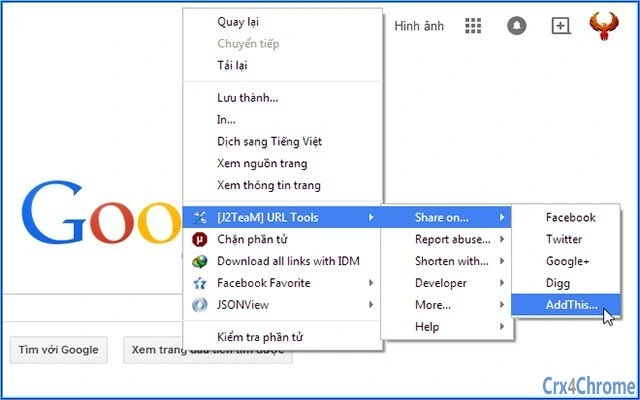
Description
URL Tools Extension for Productivity
Overview
The URL Tools Extension is designed to streamline online workflows by offering a suite of utilities for managing and analyzing web links. It targets professionals, content creators, and developers who frequently handle URLs in their daily tasks. The tool enables users to share links across social networks, report abusive content to Google, and shorten URLs using popular services like Bit.ly, Goo.gl, and TinyURL. Additional utilities include tools for developers such as Alexa rank checks, WHOIS lookups, and Facebook Debugger functionality. The extension also supports page translation and virus scanning via VirusTotal, enhancing both productivity and security. Real-world applications include social media managers verifying link safety before posting, developers debugging shared content, and marketers tracking URL performance. The extension integrates directly into the browser environment, allowing quick access to these tools without switching between applications. The developer did not provide additional information about the background or development history. The extension is intended for use in web-based workflows and does not require standalone installation.
Key Features & Capabilities
- Multi-platform URL sharing – Easily distribute links across major social networks directly from the browser.
- Abuse reporting to Google – Flag suspicious or harmful URLs for review by Google’s safety systems.
- URL shortening services – Compress long links using Bit.ly, Goo.gl, and TinyURL with one click.
- Developer-focused tools – Access Alexa ranking, WHOIS data, and Facebook Debugger for content optimization.
- Page translation – Translate entire web pages into different languages for broader accessibility.
- Security scanning – Submit URLs to VirusTotal for malware and threat detection.
- Regular updates – New features and tools are periodically added to improve functionality.
These capabilities support a wide range of workflows. For example, a digital marketer can shorten a campaign URL and share it on Twitter with a single action. A developer can use the Facebook Debugger to ensure proper metadata rendering before posting. A content moderator may report a phishing link to Google immediately. The extension enhances efficiency by consolidating multiple tools into one interface, reducing the need for external services or browser tabs.
User Interface, Workflow & Performance
The extension features a streamlined user interface that integrates into the browser’s toolbar. Navigation is intuitive, with a compact menu accessible via a single click. The workflow is designed for speed, allowing users to perform actions without leaving the current tab. Most functions are triggered with minimal interaction, supporting rapid task completion. The interface remains unobtrusive, minimizing distractions during browsing. Performance observations are based on general software behavior patterns. The developer did not specify resource usage details, so exact CPU or RAM consumption is unknown. Stability is expected to be consistent with standard browser extensions, though real-world performance may vary depending on system configuration and concurrent browser activity. The extension operates in the background and does not appear to interfere with page loading or navigation. No issues related to crashes or freezes were reported in the available information.
Compatibility & System Requirements
The URL Tools Extension is compatible with Windows, Mac, and Linux operating systems. It is designed to work with major web browsers, though specific browser versions were not listed. The installation size is 5.6 MB, which is typical for browser extensions of this nature. Exact system requirements were not listed, so users should ensure their system meets standard browser prerequisites. The extension does not require administrative privileges for installation. Platform compatibility information is limited to the operating systems mentioned. No additional hardware specifications were provided. Users should verify compatibility with their current browser environment before installation.
Pros and Cons
Pros
- Centralized access to multiple URL management tools
- Supports both personal and professional use cases
- Free to use with no hidden costs
- Regular feature updates planned
- Lightweight size at 5.6 MB
- Secure integration with trusted services like VirusTotal and Google
Cons
- No detailed system requirements provided
- Performance metrics not specified
- Developer background not disclosed
- Dependent on external services for some features
- Interface may feel minimal to power users seeking advanced customization
FAQ Section
Is the URL Tools Extension compatible with my operating system?
The extension supports Windows, Mac, and Linux. Compatibility with specific browser versions was not specified.
Is the extension safe to install and use?
The extension integrates with well-known and secure services such as Google, VirusTotal, and Bit.ly. No security vulnerabilities were reported in the available information.
Does the extension require an internet connection?
Yes, most features rely on external services and require an active internet connection to function.
Can I use the extension offline?
Basic interface access is available offline, but core features like URL shortening, scanning, and sharing require online connectivity.
How often are updates released?
The developer indicated that new features and tools will be added regularly. The frequency of updates was not specified.
Final Thoughts + CTA
The URL Tools Extension delivers a compelling set of utilities for anyone managing links across digital platforms. Its integration of social sharing, security checks, developer tools, and translation makes it a versatile asset for professionals and power users. While some technical details remain unspecified, the extension’s lightweight footprint and free access enhance its appeal. It is particularly valuable for content creators, marketers, and developers who rely on efficient URL handling. The ongoing update plan suggests a commitment to long-term usability. Download URL Tools Extension now to boost your online productivity.
Guides & Tutorials for J2TeaM] URL Tools Extension for Chrome
How to install J2TeaM] URL Tools Extension for Chrome
- Click the Preview / Download button above.
- Once redirected, accept the terms and click Install.
- Wait for the J2TeaM] URL Tools Extension for Chrome download to finish on your device.
How to use J2TeaM] URL Tools Extension for Chrome
This software is primarily used for its core features described above. Open the app after installation to explore its capabilities.
User Reviews for J2TeaM] URL Tools Extension for Chrome 0
No reviews found





